Flo for macOS · lives in your notch

Your Mac, at the

Hold a key and talk. Flo types, drafts, remembers and reminds you, right from the notch you already have. It all runs on your Mac.

Free to download On-device Whisper English, हिन्दी, ગુજરાતી Bring your own key, or stay offline
You saidauto
नमस्ते
हिन्दी · Hindi, in its own script
To-do caughtZoom · 11:20
Send the Q3 deck to Priya
You said “I'll send it tonight”
Reminder · Mon 9:55
Typed in Slack · 0.2 s

01Dictation

Hold Control. Talk.

Hold Control anywhere and speak. Let go, and clean, punctuated text lands right where your cursor is: Slack, Mail, VS Code or any text box.

Why it matters

You speak three to four times faster than you type. A reply that took a minute now takes fifteen seconds.

  • Whisper runs on your Mac. Your audio never leaves it.
  • Text appears about 0.2 s after you let go.
  • No word caps and no usage meter.
#launch
A
Aditi 10:02
Is the onboarding build up anywhere yet?
Shipped the new onboarding to staging. Can everyone test the signup flow before Friday and drop issues in this thread?
controltyped where your cursor was

Press and hold the button, like holding Control, then let go.

अहिन्दी detected · typed

02Hindi, Gujarati & English

Speak the language

Tell Flo which languages you speak. Each time you talk it picks the right one by itself and writes it in the proper script.

Why it matters

Hindi comes out in Devanagari, Gujarati in Gujarati script, and Hindi is never mistaken for Urdu. No transliteration to clean up.

  • Detects the language among the ones you speak
  • Native script, not romanised guesses
  • Same on-device speed as English
Notes
اردو
कल सुबह दस बजे तक क्लाइंट को डेमो भेज दूँगा।

Detected Hindi from your languages. Written in Devanagari script.

Tap a language and speak it to Flo.

Draft typed into #team-general

03Assistant that reads your screen

Ask for a draft. It first.

Hold fn and say what you need, like “draft a Dhanteras wish for the team”. Flo reads the conversation on screen and types the draft into the box you're in.

Why it matters

No copying context into a chatbot and pasting back. It replies in the thread's language and tone, and uses people's real names.

  • Reads the focused window only when you ask
  • Go deeper or search the web from any answer
  • Uses your own AI key or a local model
#team-general
P
Priya 16:40
Kal Dhanteras hai! Office 4 baje band ho jayega 🎉
R
Rahul 16:42
Sweets ka order de diya hai, sab le jaana
Happy Dhanteras, team! Priya, Rahul and everyone, thank you for an amazing year so far. Kal 4 baje ke baad family ke saath time enjoy karo. May this festival bring good health and lots of wins.
Try saying
Proposal typed into Upwork · 312 words

04Skills & MCP tools

Teach it once. Then

Draw a skill on a canvas: the phrases that start it, the steps, the apps it works in, the MCP tools it may call and the docs it can read. Then say “write a proposal for this job”.

Why it matters

The way you like things done stops living in your head. Proposals, standups and follow-ups come out your way, every time.

  • Write mode types the result, Do mode works the screen
  • Connect any MCP server and call its tools mid-skill
  • Attach Knowledge docs for Flo to draw on
Skill canvas · Upwork proposalWrite mode
PlatformUpwork
MCP toolGitHub · search_repos
Knowledgeportfolio.md
Output · WriteType it into the proposal box
Run a skill
Say “yes” or “no”
Send the email to Priya?

05Hands-free agent

Double-tap. Say it.

Double-tap fn and Flo keeps listening, no key held. Ask it to open apps, search, click and type, and it works your screen step by step while the notch shows every move.

Why it matters

Your hands stay free. And it never sends, posts, buys or deletes anything until you say “yes” out loud.

  • Say “stop” at any moment and it stops
  • “Open Slack” or “volume up” run instantly, offline
  • Switches itself off after 5 quiet minutes
Mail · New message
ToPriya Shah
SubjectQ3 deck
Hi Priya, here's the Q3 deck we went through this morning.
Q3-deck.pdf Send
Say it
Instant
Sorry, my mistake
Updated: tory → Tauri from now on

06Learns your words

Fix it once. It's

When you correct a word Flo got wrong, it notices. A small card in the notch confirms the new spelling, with Undo in case you didn't mean it.

Why it matters

Names, product terms and jargon stop being a fight. Say Tauri, get Tauri, every single time.

  • Learns from the edits you make after dictating
  • “Did I mishear?” saves a word in one tap
  • Your dictionary stays on your Mac
#eng
Shipping the Tauri build tonight.
…Flo noticed. Undo or keep it, right in the notch.
Your dictionary
Tauri · just nowNamanSupabaseDhanterasKubernetes
To-dos3 today

07To-dos from everywhere

The promises you make get

Flo catches what you commit to in meetings, in Slack and on screen, and keeps it behind a tray icon in your notch. Hover to see the list.

Why it matters

Every item says why it's there, so you can trust the list instead of re-checking every app.

  • “I'll send it tonight” on a call becomes a to-do
  • Unanswered Slack asks are caught for you
  • Tick off from the notch, or select many for bulk actions

Hover or tap the to-do icon in the notch to open the list, then tick items off.

Reminder · due 9:55
Send requirements to client

08Deadlines become reminders

“By next Monday” turns into

When a to-do comes with a deadline, Flo works out the real date and time and files it under Reminders.

Why it matters

It understands “by next Monday”, “tomorrow at 5pm” and “in 2 hours”, then taps you on the shoulder 5 minutes early, right in the notch.

  • Snooze 10 minutes or mark Done from the card
  • A Reminders section sits at the top of your to-dos
  • Deadlines read in your local time
Client call · notes

Budget approved for phase one.

Client: send requirements by next Monday

Design review moves to Thursday.

Pick a deadline. Flo reads it like you do
Filed automatically · matched “Acme”
Acme · Website redesign
Send Acme the homepage copy
+1 to-do

09Projects & clients

Everything under the right client.

Give a project its client, a few details and keywords. From then on, the to-dos, notes and meetings that mention them land in that project on their own.

Why it matters

Open Acme and see everything Acme: what you owe them, what was said and what's next, without sorting a thing.

  • Filed by client name and keywords
  • Progress and open to-dos for every project
  • The assistant knows your projects when it drafts
Captured today · tap one to file it
Acme
Website redesign
5items
+1
Nimbus
Mobile app
2items
Personal
No client
3items
Design sync · 24 min · 3 people

Onboarding v2 ships next sprint. The pricing page waits for legal sign-off. Client needs requirements before Monday.

Action items
PFinish the onboarding deckPriya · Thu
RShare the API timelineRahul · Fri
YSend requirements to clientYou · Mon

10Meeting notes

Listen. Flo

When a Zoom, Meet or Teams call starts, the notch offers to take notes. Flo transcribes live on your Mac, then hands you a summary and the action items when the call ends.

Why it matters

You stay in the conversation instead of typing through it, and still know who said what and who owes what.

  • Who said what: name a voice once and Flo remembers it
  • Action items land in your to-dos
  • Transcription happens on device
Design sync · live transcript
Priya

I'll finish the onboarding deck by Thursday.

Rahul

API timeline is almost done, I'll share it Friday.

You

And I'll send the client the requirements before Monday.

Summary and 3 action items ready
Claude needs you · api
Allow npm publish?

11Claude Code in your notch

Stop terminals.

Your Claude Code sessions sit in the notch tray with a live count. When one finishes or needs your permission, the notch tells you.

Why it matters

No more checking tabs every two minutes. And it doesn't cry wolf: if Claude is still running background work, Flo waits until it's really done.

  • Allow or deny a permission ask from the notch
  • Click to jump straight to that session
  • Codex and Cursor sessions show up too
~/flo · claude
> make the notch reminders snoozable● Edited src/notch/reminder.rs● Running tests in background (2 shells)✓ 142 tests passed · done[api] > publish the client? Allow Bash(npm publish) [y/n]

Allow or deny it from the notch.

Midnight City
M83 · Now playing
Today 3
Send the Q3 deck
Reply to Rahul
Requirements · Mon
Claude
flo-mvprunning
apineeds you
docsdone
--:--
Today
London--:--
San Francisco--:--

12Widgets

Glance up. It's

Open the notch for live widgets: music, to-dos, Claude sessions, world clocks, weather, focus timers and a note.

Why it matters

The things you check fifty times a day are one glance away, and gone the moment you move on.

  • Choose and reorder any of the 8 widgets
  • Add the time zones your team lives in
Widgets · tap to toggle
Ribbon

13Make it yours

It's your notch.

Pick how Flo listens back: a ribbon wave, equalizer bars, a neon line, a helix of dots or sparkles. Then choose a size, a sound and a colour.

Why it matters

You'll see it dozens of times a day. It should feel like yours, not ours.

  • 15 animation styles
  • Four sizes, from Small to Biggest
  • Chime, Glass, Soft or Pop, or silence
Preview
Animation
Size
Sound · tap to hear
Colour
Network allow-listBlocked: not on your allow-list

14Private by design

Local first. not promised.

Your voice, notes and to-dos stay on your Mac in an encrypted database. Bring your own AI key, or run fully local with Ollama.

Why it matters

Every network call passes through one allow-list you can see, host by host. Anything not on it is blocked.

  • Your keys live in the macOS Keychain
  • Fully offline mode with local models
  • We never see your dictation, notes or to-dos
Encrypted on disk

History, notes and to-dos live in an encrypted database. The key sits in your Keychain.

Bring your own key

Claude, OpenAI, Gemini, Groq and more. You pay them directly, we never proxy.

Fully local mode

Run dictation and the assistant with Ollama or LM Studio. No internet needed.

See every request

The network log shows each call: which host, why, and how many tokens.

Hover a host in the notch to see why it's allowed.

Everything Flo does

And in one app.

The notch story covers the big moments. Here is the rest of what ships in Flo today.

Privacy & setupNew

In-app updates: one click, restart, done

Flo tells you when a new version is ready. It downloads in the background, checks the signature against the key built into the app, and one restart later you're current.

Flo 1.4 is ready
Verified with Flo's signing key before it installs
Skills can call MCP toolsHands-free agent asks before sendingClock widget shows time zones
Voice

7 languages, auto-detected

English, Hindi, Gujarati, Hinglish, Spanish, German and French, each in its own script.

Hello
English · auto
Voice

Typing test

Measure your real typing speed. Flo uses it to show how much time speaking saves you.

Typing42 wpm
Speaking150 wpm
Assistant

A memory that draws itself

Flo Vault links your projects, people, meetings and topics into a local, Obsidian-style graph as you work. Search it, edit it, and let the assistant draw on it. Hover a node.

AcmePriyaDesign syncQ3 deckNimbusOnboardingRahulPricing
Voice

Instant commands

Open apps and sites, search, play music and change the volume, handled on your Mac with no AI call.

“open Slack”
0 tokens
Work

Slack, handled

Unanswered DMs and @mentions become to-dos. Reply by voice; nothing sends until you confirm in the notch.

Send to Rahul on Slack?

“Invoice is out, should land today.”

Work

Analytics

Words dictated, time saved, streaks and speaking pace over 7, 30 or 60 days.

Mon2 h 14 m saved this weekSun
Work

Searchable history

Every dictation and every answer, kept on your Mac and one search away.

invoice
Slack…send the invoice by Friday…2 h
MailAttached the March invoice…Tue
Assistant

Any AI: your key, or none at all

Bring a key for Claude, OpenAI, Gemini, Groq, OpenRouter, MiniMax, Qwen or Ollama Cloud, or run fully local with Ollama and LM Studio. Pick a model per feature.

ClaudeOpenAIGeminiGroqOpenRouterClaudeOpenAIGeminiGroqOpenRouter
MiniMaxQwenOllama CloudOllamaLM StudioMiniMaxQwenOllama CloudOllamaLM Studio
Notch

One accent, everywhere

Pick any colour. Buttons, charts, the logo and the notch all follow it.

Tap one: the notch on this page changes with it.

Notch

Sounds you choose

Chime, Glass, Soft or Pop, set separately for each cue. Tap to hear them.

readyworkingdoneerrornotify
Notch

15 animations, 4 sizes

From Ribbon to Constellation, Small to Biggest. Text in the notch grows with it.

Ribbon
Assistant

Every coding agent

Claude Code, Codex CLI and Cursor sessions in the notch tray, plus any tool through a local webhook.

Claude CodeCodex CLICursorAny tool · webhook
Assistant

Go deeper, or search the web

Every quick answer offers a deeper look at your screen, a web search, or the full answer in the app.

Assistant

Knowledge docs

Pin notes and docs and set your own system prompt. Only the relevant pieces are sent with a request, so tokens stay low.

Work

Meeting library

Every meeting with its summary, action items and transcript. Rename a speaker once and Flo knows the voice next time.

Work

To-dos, in detail

Details, due dates, snooze, and bulk complete or delete. Every to-do says where it came from.

Work

Spots to-dos on screen

On-device OCR reads the window you're in for things you've promised. Screenshots are never saved, and you can pause it any time.

Voice

Your keys, your way

Remap dictation and the assistant to the keys you like. If macOS grabs fn, one click fixes it.

control hold to dictatefn hold for the assistantfnfn double-tap for hands-free
Voice

Choose your speech engine

On-device Whisper by default, with models you download and remove in Settings. Or Groq or OpenAI Whisper with your own key.

Privacy & setup

Network log

Every request Flo makes: which host, why, and how many tokens. Anything off the allow-list is blocked.

api.anthropic.comassistant · 412 tok
localhost:11434ollama · local
tracker.exampleblocked
Privacy & setup

Encrypted on disk

History, notes and to-dos live in an encrypted database. Its key and your API keys stay in the macOS Keychain.

Privacy & setup

Permissions, fixed for you

Flo checks microphone, accessibility and screen access, and repairs them in one click when macOS forgets.

Privacy & setup

Mac, Windows and Linux

Off the Mac, the island sits bottom-right. Hold Right Ctrl to dictate and Right Alt for the assistant.

Privacy & setup

An account that holds nothing

Sign in only to download. Your dictation, notes, to-dos and keys never touch our servers.

Everything above runs on your Mac unless you choose a cloud provider with your own key.

Behind the notch

One calm app keeps

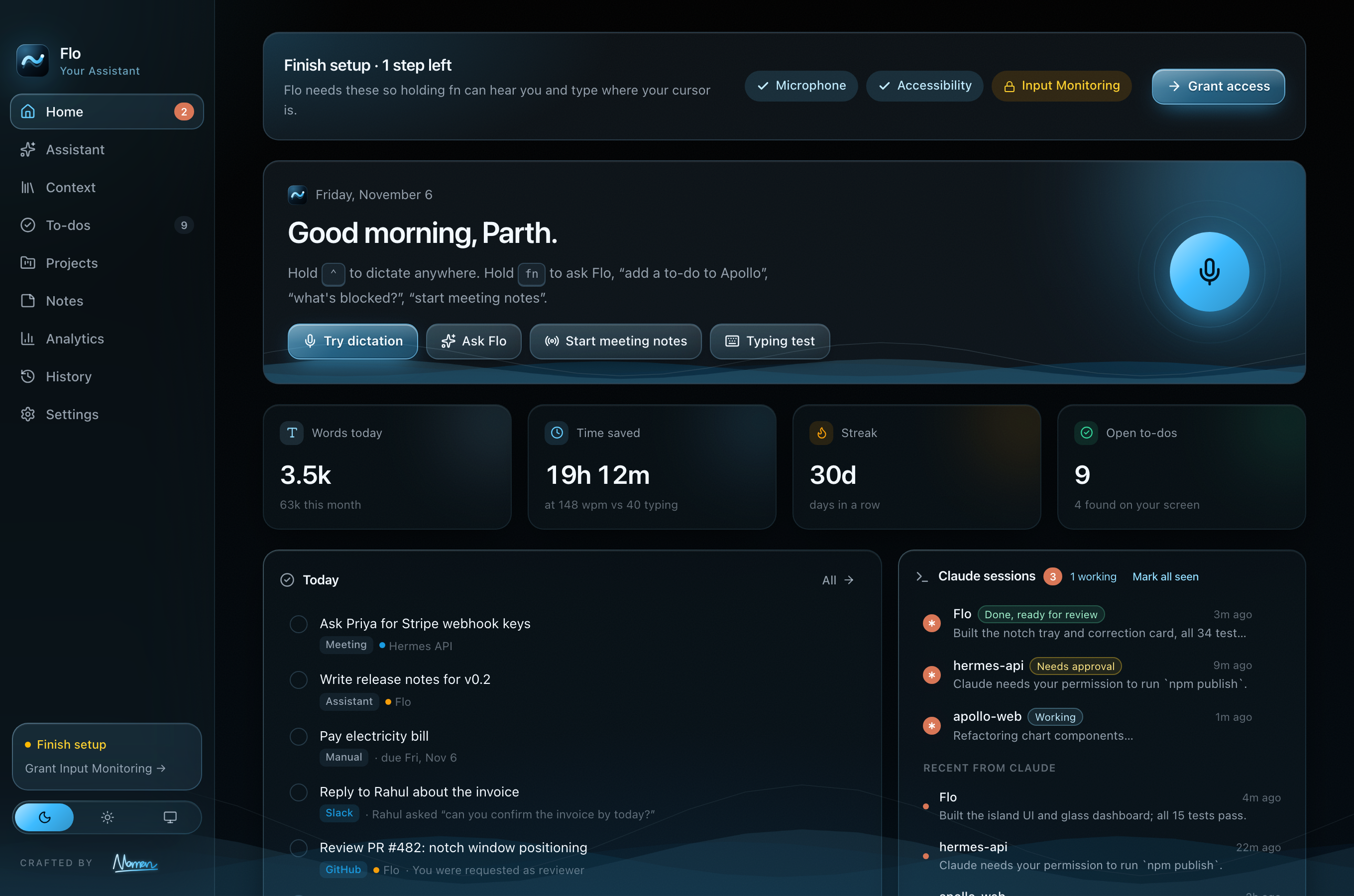
History, notes, to-dos, your dictionary and analytics, in a dashboard that never leaves your Mac.

The Flo dashboard: recent dictations, words this week and time saved

Compare

to Wispr Flow and Lemon

Everything they do, plus the things they don’t, without sending your life to someone else’s server.

Feature FloWispr FlowLemon
On-device speech to text
Bring your own AI key
Fully local mode (Ollama)
Assistant that reads your screen
Live meeting notes
Claude Code / Codex / Cursor tray
Slack to-dos with confirmed send
History and memory stay on device
No word or task caps
Windows and LinuxMac, Win, LinuxMac, WindowsMac
PriceFree, your keysSubscriptionFree, then paid

Based on our review of the public Wispr Flow and Lemon Mac apps in November 2026. Products change; tell us if something is out of date.

Naman Gundaniya

Made by

Naman Gundaniya

Forward Deployed Engineer

“I'm the human. AI is my leverage. Together, we build anything.”
hellonaman.com

FAQ

Questions,

Start instead of typing

Free to download. Bring your own AI or stay fully local.